Introducing Drumagog 6
It’s the biggest update Drumagog has had in more than twenty years of replacing drums. Everything was rebuilt from the ground up. On a single drum bus Drumagog can now replace the whole kit at once. Every hit it finds appears on the waveform, ready for tweaking. The library now sorts itself by how close each sound is to the drum you recorded, triggering and alignment improvements, and much more!
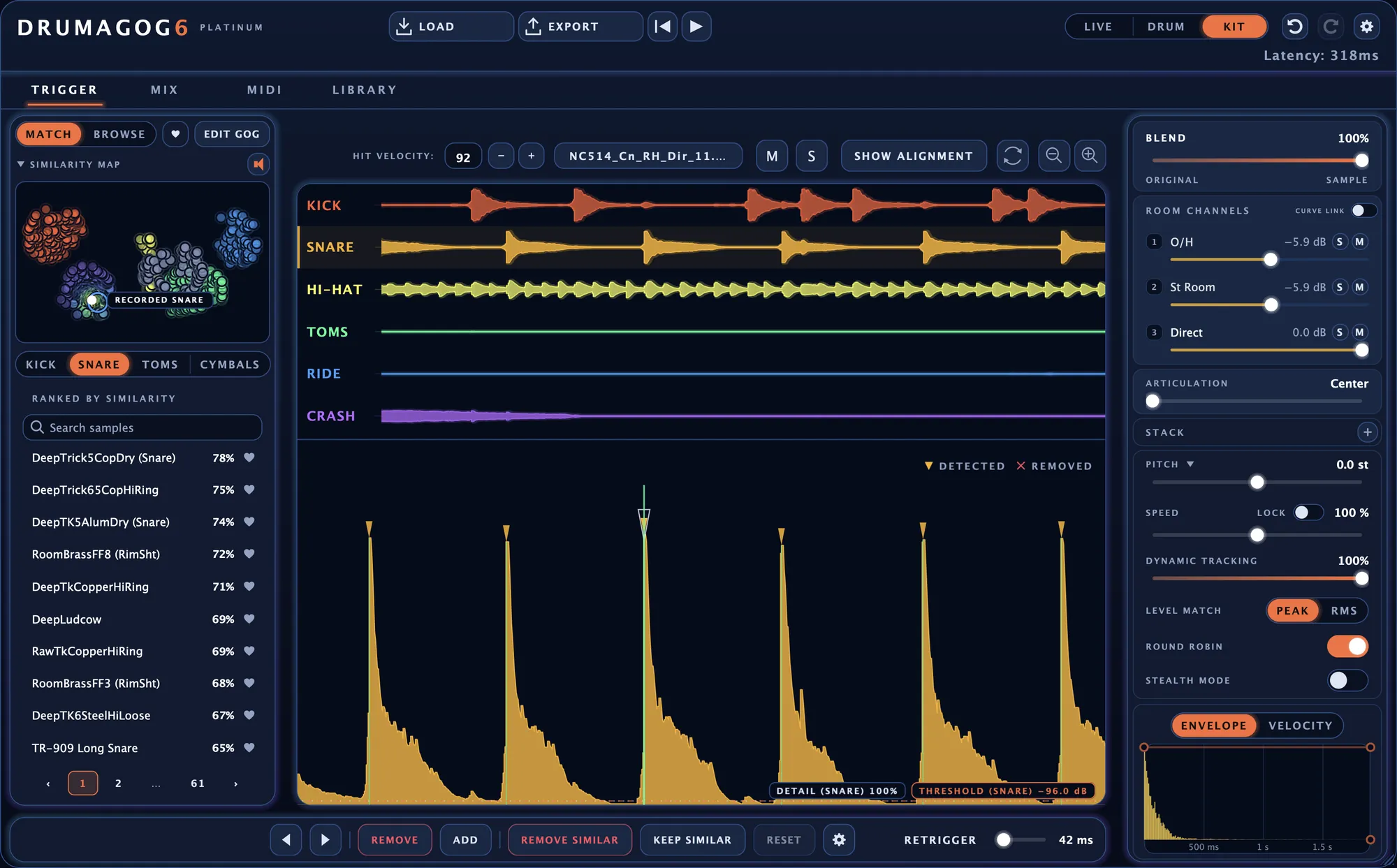
Finding the hits is the hard part.
A ghost note can hide under the ring of the stroke before it. And a snare mic usually picks up plenty of kick. Those are the spots where drum replacement tends to fall apart. Engineers often end up adding the triggers in by hand.
Drumagog 6 draws every hit it finds as a marker on the waveform. Drag the THRESHOLD line down and the quiet ghost notes appear while you drag. When the kick keeps triggering the snare, you can clear all of those false hits with a click of the REMOVE SIMILAR button.
In Kit mode Drumagog can automatically trigger off each separate drum inside of a stereo drum track.
Pick the mode that fits the track.
Live
Use Live mode when a drummer needs to hear the new sound right away, in the studio or on stage. It fires each sample the moment the drum crosses the THRESHOLD line. The delay is about 2 ms, too short for a drummer to notice.
Drum
For mixing a snare or kick close mic, Drum mode is the everyday choice. Looking 80 ms ahead lets it judge each hit more carefully. It also keeps a timeline of every hit for you to check and fix afterward.
Kit Platinum
Put one copy of Drumagog on the drum bus and Kit mode replaces the whole kit. Each drum shows up as a lane on the TRIGGER page and as a strip on the MIX page.
Move any hit Drumagog found.
The height of each marker shows how hard that hit was played. Drag a marker sideways to move the hit, or up and down to make it harder or softer. If Drumagog missed a hit, double-click the waveform where it belongs.
And there’s also a powerful new tool – Drumagog now lets you click on a detected trigger and tell it to remove all other drum hits that sound similar to it. Or to only keep hits that sound like it and delete the rest.
The two buttons are REMOVE SIMILAR and KEEP SIMILAR. Whatever they take out, one undo brings back.
Checking and fixing the hits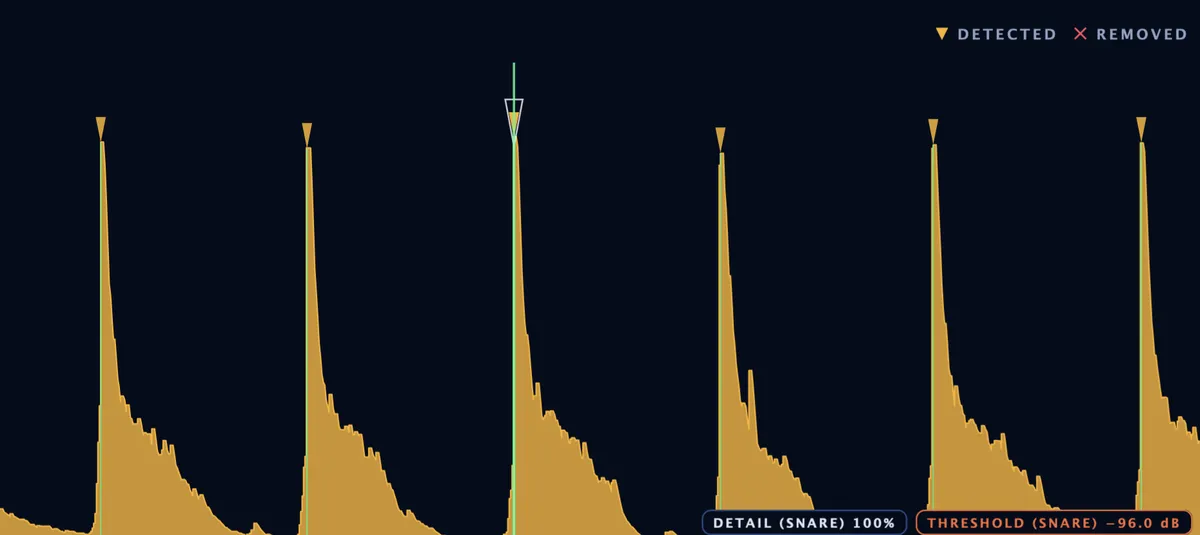
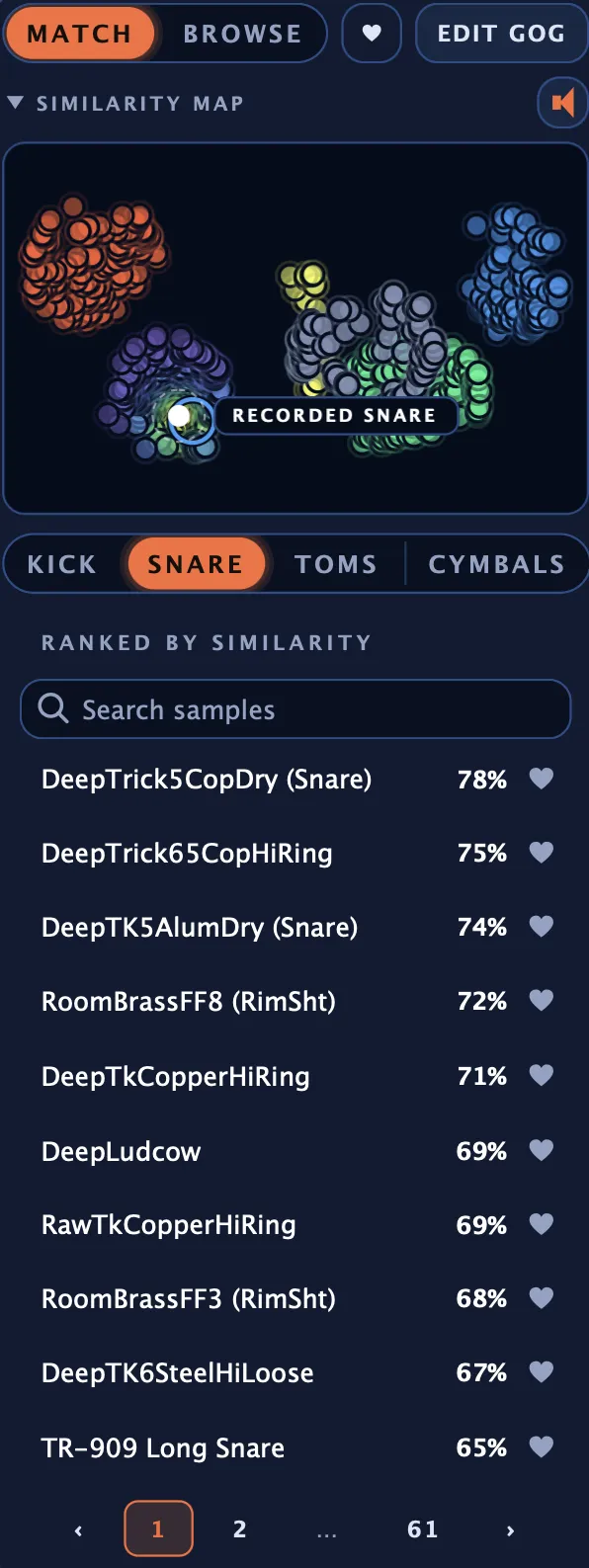
Drumagog will find you a snare that sounds like your original.
Play the song through once and Drumagog measures the drum on your track. Every GOG in your library is then sorted by how close it sounds, with a percentage on each row. The same collection appears as a map on the LIBRARY page. Hover over a dot there to hear that GOG.
To narrow the list further, click one of the six tags for that kind of drum, such as CRACK or FAT for a snare. The tags come from measuring the sound.
The library and the GOG format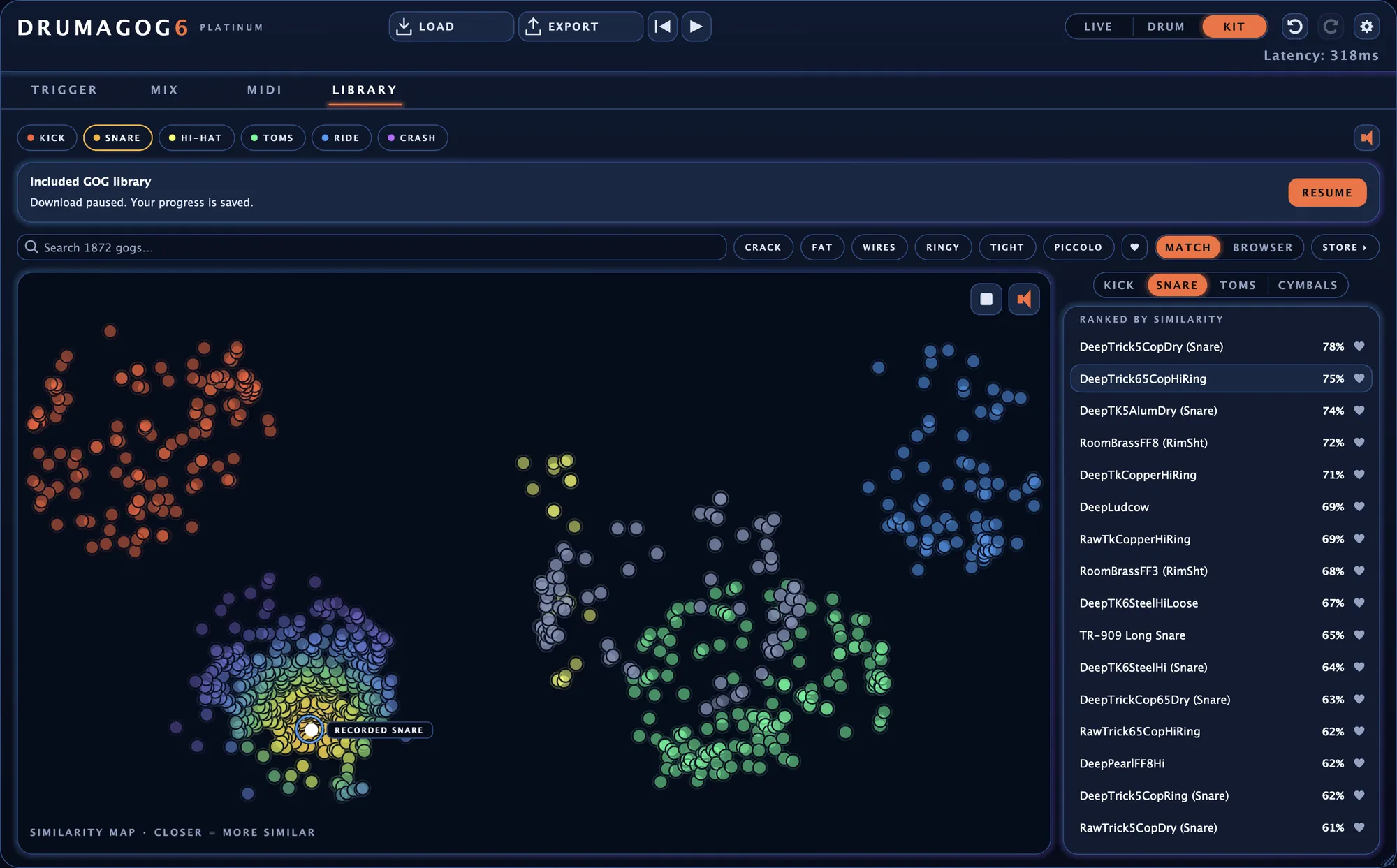
Every drum gets its own channel strip.
On the MIX page there are two independent channel strips – one for tweaking the sound before Drumagog triggers on it, and one for after. The PRE-TRIGGER page cleans up the drum before Drumagog listens for hits. A low cut on the snare’s EQ, for example, can stop the kick from setting it off.
The POST-TRIGGER page is where you mix. There each drum has an EQ, a transient shaper, a convolution reverb and a synth layer. Pan, the fader, mute and PHASE sit below them. Every display shows the real signal as it plays.
The gate, the transient shaper and the reverb come with Platinum. Pro’s strips hold the EQ and the synth layer.
The mixer and the effects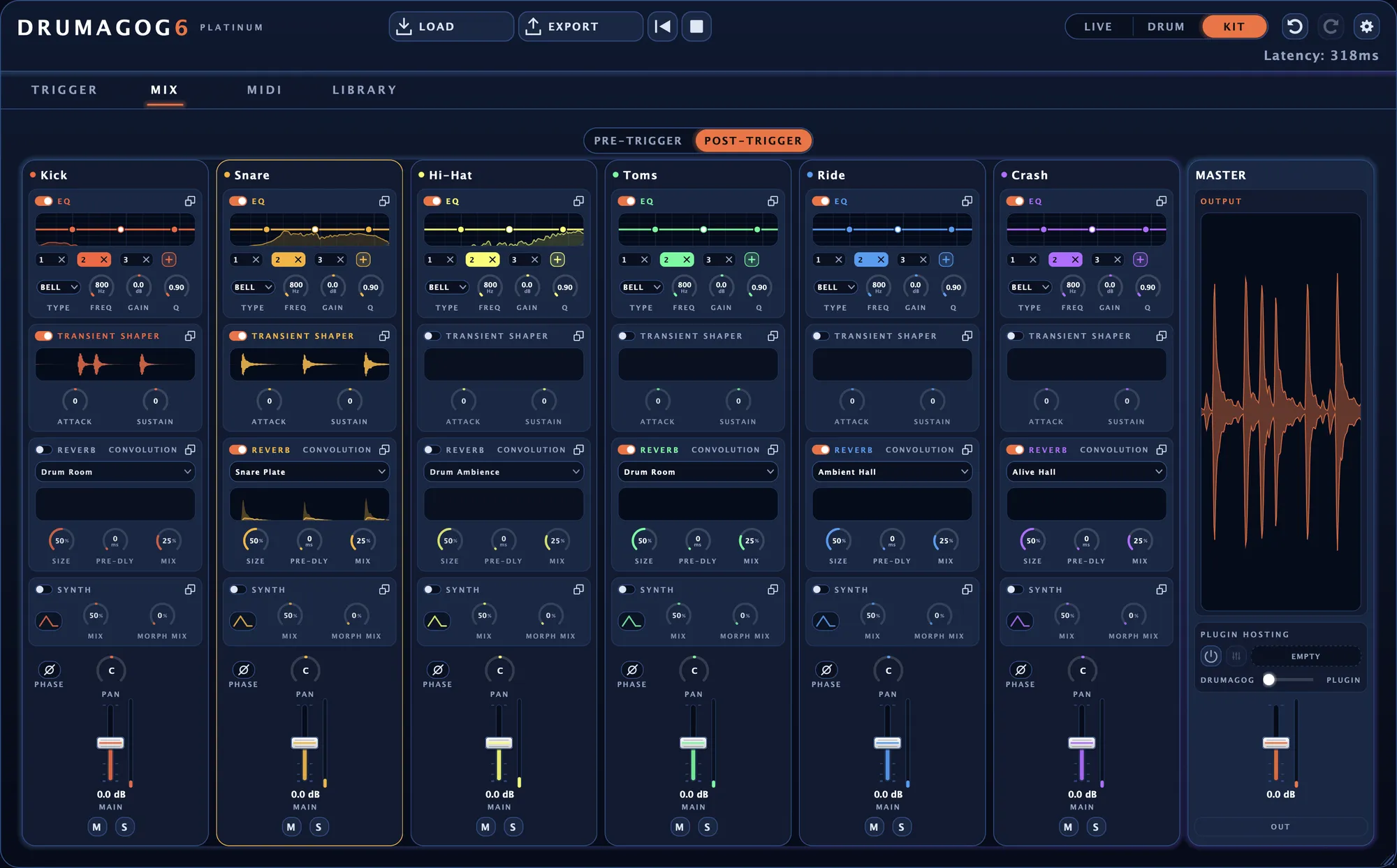
The MIDI page is a full piano roll.
Every note on the piano roll is one of the hits Drumagog found. Editing the notes works the way it does in your DAW, with one undo history shared with the TRIGGER page.
The quickest way into your DAW is to drag the whole take out as a MIDI clip. Drumagog also sends every note out of the plug-in’s MIDI output. For DAWs that can’t record that output, Logic among them, a virtual MIDI port shows up as a device any DAW can record from. Ready-made note maps cover General MIDI and Toontrack’s Superior Drummer and EZdrummer.
MIDI in and out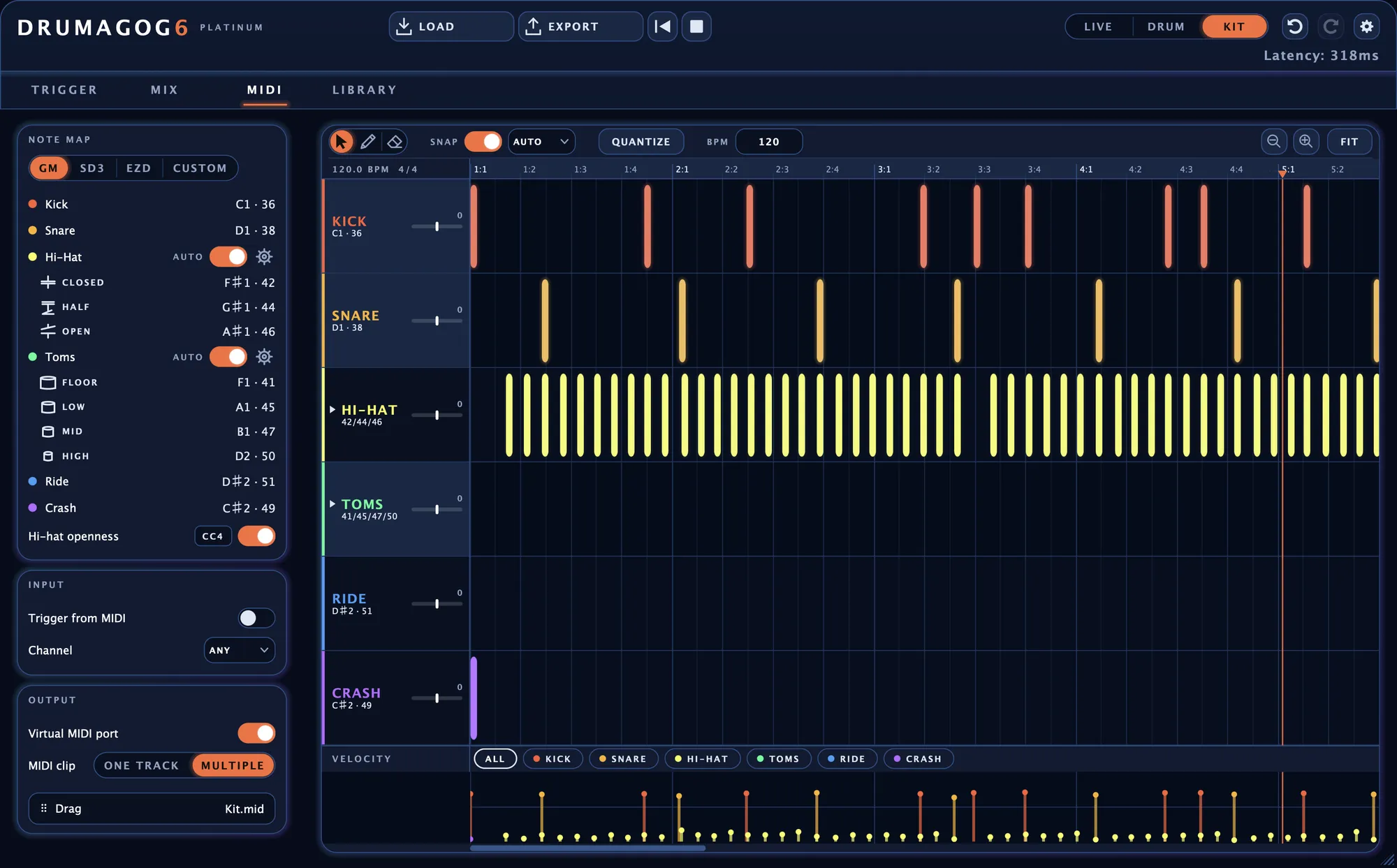
Build your own GOGs.
Drop a folder of samples onto the window and Drumagog builds a GOG from them. It measures how hard each sample was hit and sorts them from soft to loud. As each one comes in, Drumagog trims it to start right at the attack.
To add more, click ADD FROM AUDIO in the GOG editor. Choose an audio file and Drumagog adds every hit it finds there as a sample of its own. You can also play your song and let Drumagog capture the hits straight from the track.
The GOG editor lets you move samples between dynamic groups and add room mics and articulations. Double-click any sample to trim it, fade it or change its level. Once you save the GOG, it joins your library and shows up in the ranked list.
Building and editing GOGs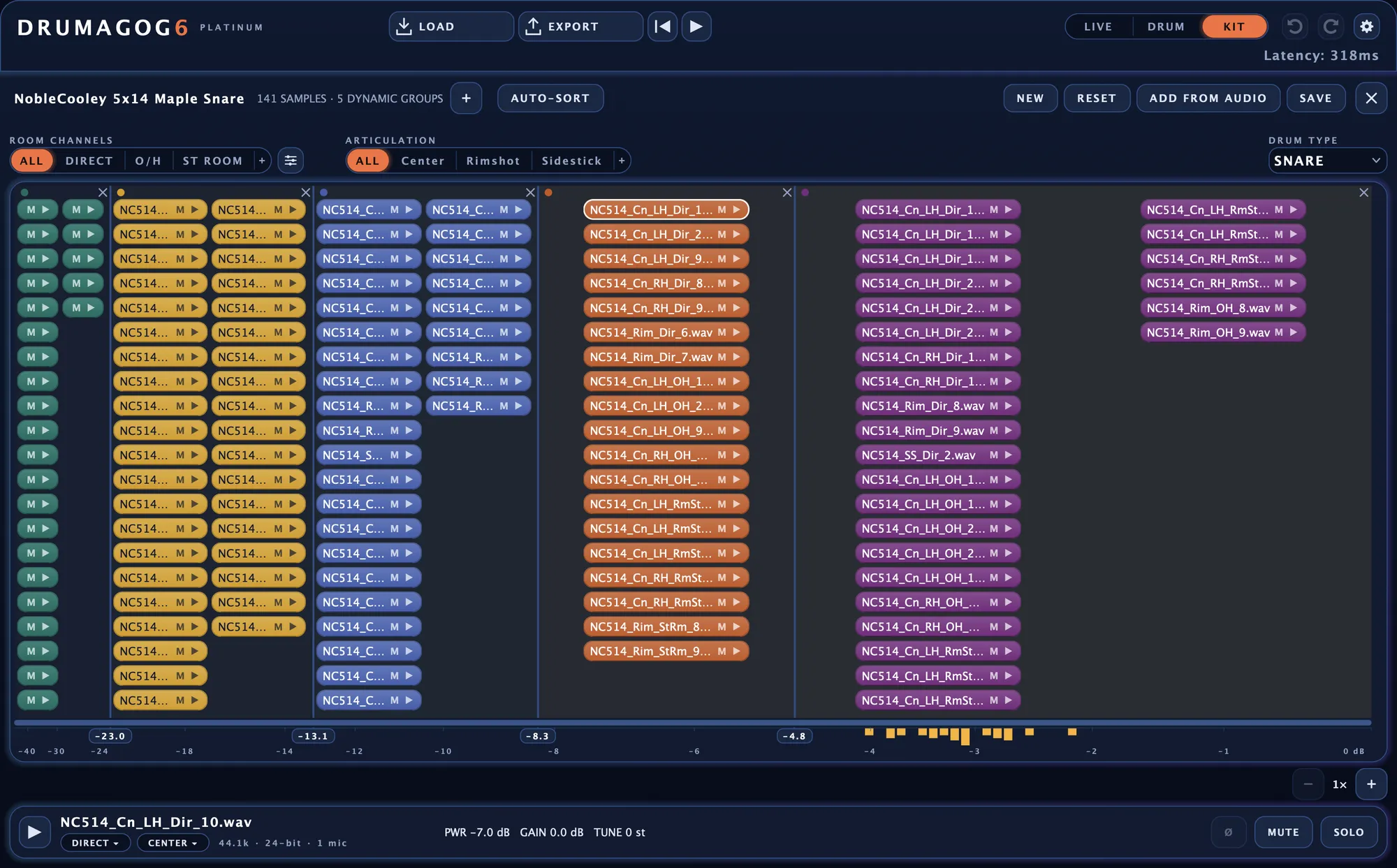
Share GOGs with other Drumagog users.
In the Community, Drumagog users share the GOGs they make. Drumagog ranks every shared GOG against the drum on your track, the same way it ranks your own library. Listen to any of them, then click GET to add it to your library for free.
To share one of yours, right-click it and choose Share to Community. Everyone may use a Community GOG in their music, commercial releases included.
The Drumagog Community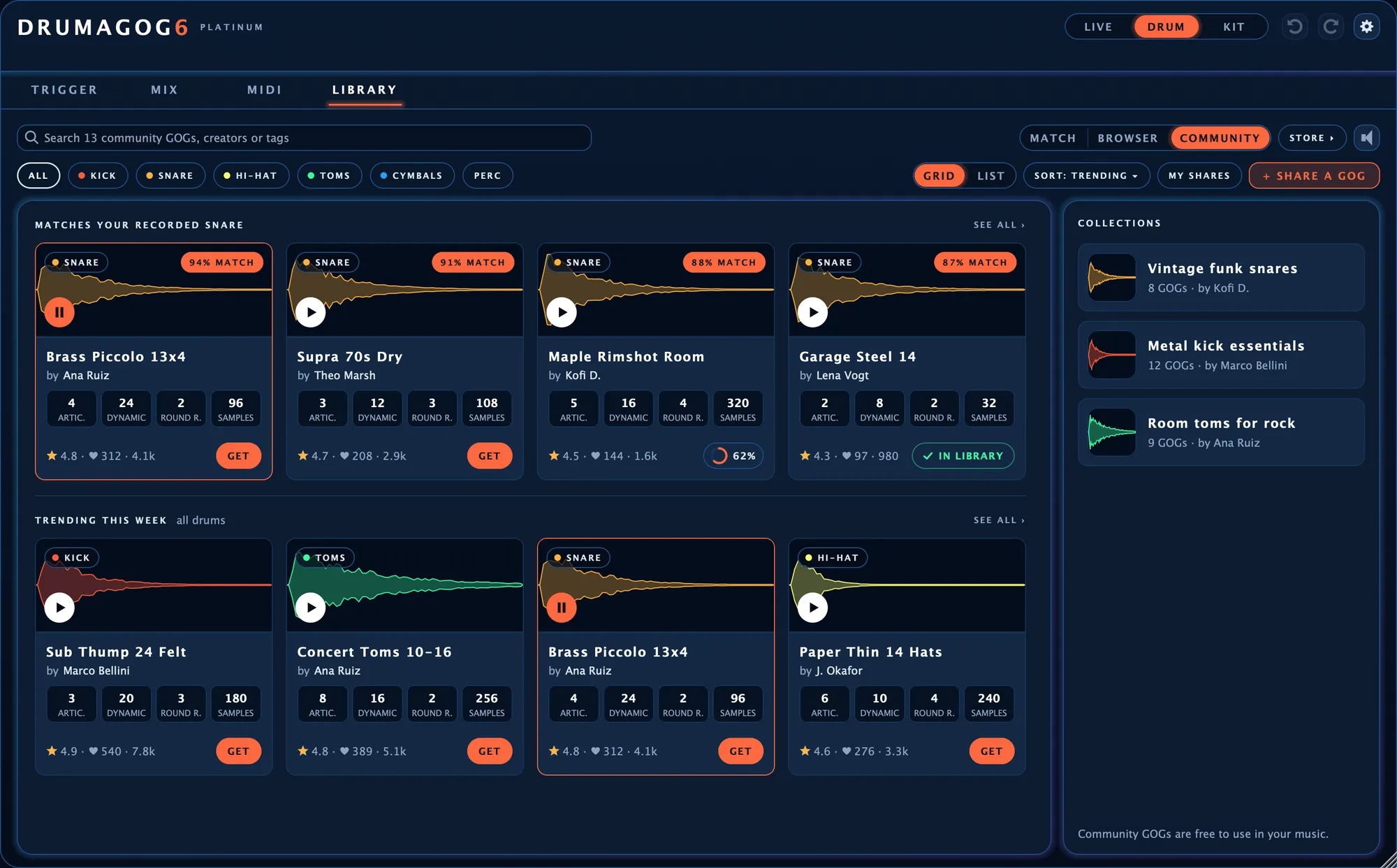
Your audio never leaves your computer.
Everything Drumagog does to your audio happens on your own machine, from finding the hits to separating the kit.
You sign in once on each computer to activate your license. After that you can work without an internet connection, in a live room or a studio that isn’t on the network.
Coming from Drumagog 5?
On a single drum, Drumagog 6 still works the way you know. Here’s what’s new, and what’s worth knowing before you switch. The full list of changes
What’s new
Kit mode Platinum
One copy of Drumagog on the drum bus replaces the whole kit. Each drum gets a lane on the TRIGGER page and a strip on the MIX page.
Hits you can edit New
In Drum and Kit mode every hit Drumagog found shows up on the waveform, where you can move it or change how hard it plays. REMOVE SIMILAR fixes a whole group of mistakes in one click.
A library that sorts itself New
Drumagog measures the drum on your track and ranks every GOG you own by how close it sounds. On the LIBRARY page you can hover over the map to hear each one.
ARA 2 support New
In DAWs that support ARA 2, Drumagog reads the whole track at once. In Drum mode the hits are already on the waveform before you press play.
A transient shaper and a gate Platinum
The transient shaper sharpens or softens the attack of each hit and makes its body longer or shorter. The gate silences bleed between the hits and shows you what it cuts while the song plays.
A better synth layer Improved
The synth under each drum has a new editor with 24 presets. You shape the tone, the pitch sweep and the noise while a spectrum shows you the hit.
Sample layering Platinum
STACK layers several GOGs on one drum, each at its own level. You can even tune one layer high and another low.
Envelope and velocity New
The ENVELOPE tab fades each sample in and shortens its tail. On the VELOCITY tab you bend the curve that decides which samples each hit plays.
MIDI for every drum New
Every hit is also a MIDI note on the piano roll. Drag the notes into your DAW as a clip, or play another drum instrument with them.
Add from audio New
ADD FROM AUDIO turns the hits in an audio file into samples for your GOG. Or play the song and Drumagog captures them straight from your track.
A full sample editor New
Double-click any sample in a GOG to trim it, fade it, normalize it or change its level. AUTO-TRIM and TRIM SILENCE can do the trimming for you.
A standalone app New
Drumagog also runs as an app of its own. Open a recording, replace the drums and export the result as a WAV file without opening your DAW.
Worth knowing before you switch
Your GOGs load as they are
Drumagog 6 plays every GOG from earlier versions.
Drumagog 5 can stay installed
Drumagog 6 is a separate plug-in with its own folders. You can keep Drumagog 5 on the same computer and use whichever one you like.
PITCH keeps the length Changed
Tuning a sample down no longer makes it ring longer. A separate SPEED control changes the length and leaves the pitch alone. With it you can shorten a ringing snare without making it go sharp. If you miss the Drumagog 5 behavior, turn on LOCK beside SPEED.
Two editions
- VST3, AU, AAX and the standalone app
- Live and Drum mode for every kind of drum
- Editable hits and the MIDI piano roll
- EQ and the synth layer
- MIDI out, the MIDI clip and the virtual MIDI port
- The full factory GOG library, as a download
- Everything in Drumagog 6 Pro
- Kit mode, for a whole kit from one drum bus
- Automatic hi-hat and tom tracking
- The gate and the transient shaper
- Convolution reverb on each drum
- Morph|Engine on the synth layer
- Plugin hosting, for your own drum instrument
- STACK, for layering GOGs on one drum
How Drumagog 6 compares
Thinking about another drum replacer too? See how Drumagog 6 measures up on the questions buyers ask most. All the comparisons
Put it on the worst drum track you’ve got.
Try every Platinum feature free for a week.
Specs & FAQ · Sample libraries · What’s new since version 5 · User’s Guide · GOG Maker · Release notes